
Gemini Calendar2.13 - Google Play
You'll be able to see results in few seconds.
Publisher Description
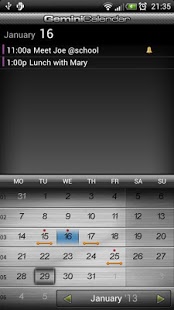
*** If you have any problems, email me ***
Easy to use calendar application that synchronizes data with Google Calendar.
* Adding events by voice (voice recognition),
* Innovative data input method
* COPY / PASTE event function (clipboard)
* Adding new events using Voice Recognition
* Instant and easy event browsing (point-to-see method)
* Bi-weekly event repetition
* Every x days/months/years event repetition
* Many other event repetition parameters
* Adding events from history log & address book
* Shortcuts & widgets
* Many settings can be adjusted in the preferences
* Two skins (dark and light for registered users)
* Attendees (guests) displayed, with their state (yes/no/maybe)
* Month change: swipe left or right over the month name in Month View
* Day View list of events: double click desired day
* Translated to many languages
Current list of features can be found on my site: http://mobilepaprika.com. I specially recommend to read the section Tips & Tricks and see the videos presenting the application’s features.
Free (unregistered) version has ads on some screens, some functionality can be limited. You can purchase the licence and have ad-free and unlimited version - see About menu and http://mobilepaprika.com for other differences between a free and full version.
If you encounter any problem - send me email. I cannot answer your questions in the Android Market platform. You can write to me in English or Polish.
----
Keys for searching in Android Market:
calendar, agenda, kalendar, kalender, kalendarz, calendario, kalenter, naptár, bi-weekly, recurrent, event, copy/paste, copy paste, kalendář, kalendár, 日曆, 日历, Календарь, Féilire, kalenteri, koledar, calendrier, Kalender, ημερολόγιο, Calendário, voice recognition, voice event
About Gemini Calendar
The company that develops Gemini Calendar is Mobile Paprika. The latest version released by its developer is 2.13.
To install Gemini Calendar on your Android device, just click the green Continue To App button above to start the installation process. The app is listed on our website since 2016-02-29 and was downloaded 0 times. We have already checked if the download link is safe, however for your own protection we recommend that you scan the downloaded app with your antivirus. Your antivirus may detect the Gemini Calendar as malware as malware if the download link to com.gemini.calendar is broken.
How to install Gemini Calendar on your Android device:
- Click on the Continue To App button on our website. This will redirect you to Google Play.
- Once the Gemini Calendar is shown in the Google Play listing of your Android device, you can start its download and installation. Tap on the Install button located below the search bar and to the right of the app icon.
- A pop-up window with the permissions required by Gemini Calendar will be shown. Click on Accept to continue the process.
- Gemini Calendar will be downloaded onto your device, displaying a progress. Once the download completes, the installation will start and you'll get a notification after the installation is finished.
Program Details
System requirements
Download information
Pricing
Version History
version 2.13
posted on 2016-02-29
- Widget dimensions fix,- Ads sometimes displayed for paid app,- Calendar colors was selected in a wrong way
version 1.0.9
posted on 2011-04-09
Several fixes and updates
Disclaimer
Official Google Play Link
We do not host Gemini Calendar on our servers. We did not scan it for viruses, adware, spyware or other type of malware. This app is hosted by Google and passed their terms and conditions to be listed there. We recommend caution when installing it.
The Google Play link for Gemini Calendar is provided to you by apps112.com without any warranties, representations or guarantees of any kind, so access it at your own risk.
If you have questions regarding this particular app contact the publisher directly. For questions about the functionalities of apps112.com contact us.
